


<div align="center">
  <br />
    <a href="https://www.youtube.com/watch?v=f8Z9JyB2EIE" target="_blank">
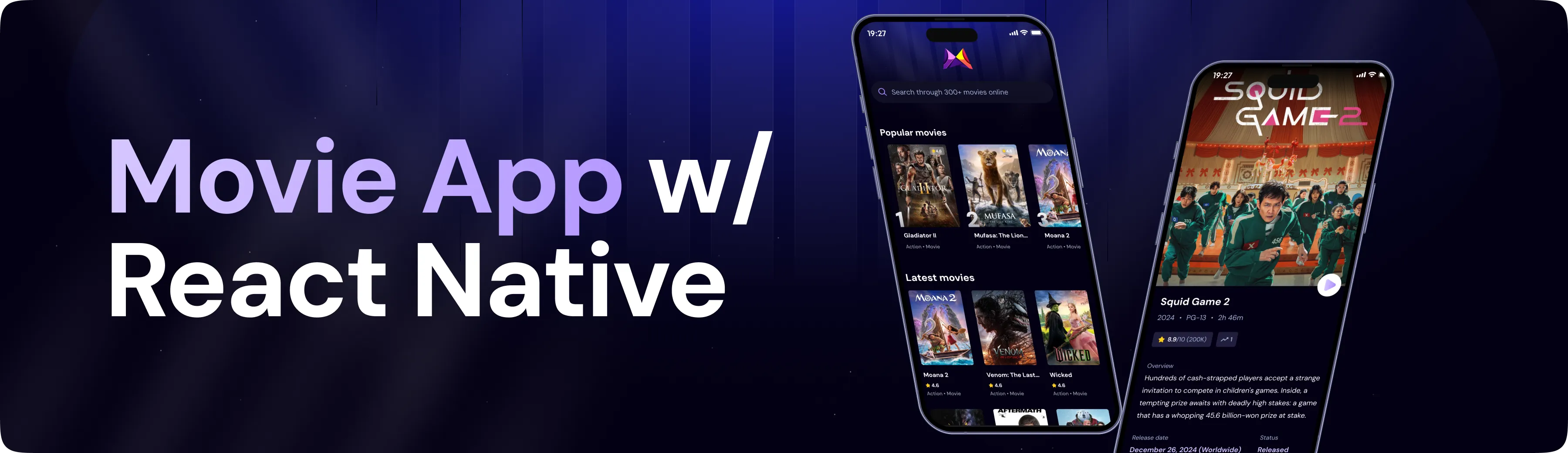
      <img src="assets/readme/hero.webp" alt="Project Banner">
    </a>
  <br />

  <div>
    <img src="https://img.shields.io/badge/-React_Native-black?style=for-the-badge&logoColor=white&logo=react&color=61DAFB" alt="React Native" />
    <img src="https://img.shields.io/badge/-Expo-black?style=for-the-badge&logoColor=white&logo=expo&color=000020" alt="Expo" />
    <img src="https://img.shields.io/badge/-TypeScript-black?style=for-the-badge&logoColor=white&logo=typescript&color=3178C6" alt="TypeScript" />
    <img src="https://img.shields.io/badge/-Tailwind_CSS-black?style=for-the-badge&logoColor=white&logo=tailwindcss&color=06B6D4" alt="Tailwind CSS" />
    <img src="https://img.shields.io/badge/-Appwrite-black?style=for-the-badge&logoColor=white&logo=appwrite&color=F02E65" alt="Appwrite" />
  </div>

  <h3 align="center">A Movie Finding App with Extensive Search</h3>

   <div align="center">
     Build this project step by step with our detailed tutorial on <a href="https://www.youtube.com/@javascriptmastery/videos" target="_blank"><b>JavaScript Mastery</b></a> YouTube. Join the JSM family!
    </div>
</div>

## 📋 <a name="table">Table of Contents</a>

1. 🤖 [Introduction](#introduction)

2. ⚙️ [Tech Stack](#tech-stack)

3. 🔋 [Features](#features)

4. 🤸 [Quick Start](#quick-start)

5. 🕸️ [Snippets (Code to Copy)](#snippets)

6. 🔗 [Assets](#links)

7. 🚀 [More](#more)

## 🚨 Tutorial

This repository contains the code corresponding to an in-depth tutorial available on our YouTube channel, <a href="https://www.youtube.com/@javascriptmastery/videos" target="_blank"><b>JavaScript Mastery</b></a>.

If you prefer visual learning, this is the perfect resource for you. Follow our tutorial to learn how to build projects like these step-by-step in a beginner-friendly manner!

<a href="https://www.youtube.com/watch?v=f8Z9JyB2EIE" target="_blank"><img src="https://github.com/sujatagunale/EasyRead/assets/151519281/1736fca5-a031-4854-8c09-bc110e3bc16d" /></a>

## <a name="introduction">🤖 Introduction</a>

Built with Expo, TypeScript, and Tailwind CSS, this app fetches movies and creates a popularity algorithm using Appwrite. It provides users with a seamless browsing experience, ranking movies based on various engagement metrics. The app leverages modern UI/UX principles for a responsive and visually appealing interface, ensuring real-world scalability and performance.

If you're getting started and need assistance or face any bugs, join our active Discord community with over **50k+** members. It's a place where people help each other out.

<a href="https://discord.com/invite/n6EdbFJ" target="_blank"><img src="https://github.com/sujatagunale/EasyRead/assets/151519281/618f4872-1e10-42da-8213-1d69e486d02e" /></a>

## <a name="tech-stack">⚙️ Tech Stack</a>

- **[Expo](https://expo.dev/)** is an open-source platform for building universal native apps (Android, iOS, web) using JavaScript/TypeScript and React Native. It features file-based routing via Expo Router, fast refresh, native modules for camera/maps/notifications, over-the-air updates (EAS), and streamlined app deployment.

- **[React Native](https://reactnative.dev/)** is a framework for building mobile UIs with React. It enables component‑based, cross-platform development with declarative UI, deep native API support, and is tightly integrated with Expo for navigation and native capabilities.

- **[Appwrite](https://jsm.dev/rn25-appwrite)** is an open-source backend-as-a-service platform offering secure authentication (email/password, OAuth, SMS, magic links), databases, file storage with compression/encryption, real-time messaging, serverless functions, and static site hosting via Appwrite Sites—all managed through a unified console and microservices architecture.

- **[TypeScript](https://www.typescriptlang.org/)** is a statically-typed superset of JavaScript providing type annotations, interfaces, enums, generics, and enhanced tooling. It improves error detection, code quality, and scalability—ideal for robust, maintainable projects.

- **[Tailwind CSS](https://tailwindcss.com/)** is a utility-first CSS framework enabling rapid UI design via low-level classes. In React Native/Expo, it’s commonly used with NativeWind to apply Tailwind-style utilities to mobile components.

- **[NativeWind](https://www.nativewind.dev/)** brings Tailwind CSS to React Native and Expo, allowing you to style mobile components using utility-first classes for fast, consistent, and responsive UI design.

## <a name="features">🔋 Features</a>

### Features of the Mobile Movie AppProject

👉 **Real-time data**: Fetching and displaying real-time movie data

👉 **Home Page**: Featured and discover movies

👉 **Search Page**: Search for your favorite movies

👉 **Popularity algorithm**: Track user searches to display the most popular movies

and many more, including code architecture and reusability.

## <a name="quick-start">🤸 Quick Start</a>

Follow these steps to set up the project locally on your machine.

**Prerequisites**

Make sure you have the following installed on your machine:

- [Git](https://git-scm.com/)

- [Node.js](https://nodejs.org/en)

- [npm](https://www.npmjs.com/) (Node Package Manager)

**Cloning the Repository**

```bash
git clone https://github.com/adrianhajdin/rn-movie-app.git

cd rn-movie-app
```

**Installation**

Install the project dependencies using npm:

```bash
npm install
```

**Set Up Environment Variables**

Create a new file named `.env` in the root of your project and add the following content:

```env

EXPO_PUBLIC_MOVIE_API_KEY=

EXPO_PUBLIC_APPWRITE_PROJECT_ID=

EXPO_PUBLIC_APPWRITE_DATABASE_ID=

EXPO_PUBLIC_APPWRITE_COLLECTION_ID=
```

Replace the placeholder values with your actual TMDB API key, Appwrite project ID, Database ID, and Collection ID. You can obtain these credentials by signing up on the [Appwrite](https://jsm.dev/rn25-appwrite), [TMDB](https://www.themoviedb.org/login).

**Running the Project**

```bash

npx expo start

```

Open your ExpoGO app on your phone and scan the QR code to view the project.

## <a name="snippets">🕸️ Snippets</a>

<details>

<summary><code>tailwind.config.js</code></summary>

```typescript
/** @type {import('tailwindcss').Config} */
module.exports = {
  content: ["./app/**/*.{js,jsx,ts,tsx}", "./components/**/*.{js,jsx,ts,tsx}"],
  presets: [require("nativewind/preset")],
  theme: {
    extend: {
      colors: {
        primary: "#030014",
        secondary: "#151312",
        ratingBox: "#221F3D",
        searchBar: "#0F0D23",
        text: "#9CA4AB",
        darkAccent: "#AB8BFF",
        accentText: "#A8B5DB",
        secondaryText: "#D6C7FF",
      },
    },
  },
  plugins: [],
};
```

</details>

<details>

<summary><code>app/globals.css</code></summary>

```css
@tailwind base;
@tailwind components;
@tailwind utilities;
```

</details>

<details>

<summary><code>interfaces/interfaces.d.ts</code></summary>

```typescript
interface Movie {
  id: number;
  title: string;
  adult: boolean;
  backdrop_path: string;
  genre_ids: number[];
  original_language: string;
  original_title: string;
  overview: string;
  popularity: number;
  poster_path: string;
  release_date: string;
  video: boolean;
  vote_average: number;
  vote_count: number;
}

interface TrendingMovie {
  searchTerm: string;
  movie_id: number;
  title: string;
  count: number;
  poster_url: string;
}

interface MovieDetails {
  adult: boolean;
  backdrop_path: string | null;
  belongs_to_collection: {
    id: number;
    name: string;
    poster_path: string;
    backdrop_path: string;
  } | null;
  budget: number;
  genres: {
    id: number;
    name: string;
  }[];
  homepage: string | null;
  id: number;
  imdb_id: string | null;
  original_language: string;
  original_title: string;
  overview: string | null;
  popularity: number;
  poster_path: string | null;
  production_companies: {
    id: number;
    logo_path: string | null;
    name: string;
    origin_country: string;
  }[];
  production_countries: {
    iso_3166_1: string;
    name: string;
  }[];
  release_date: string;
  revenue: number;
  runtime: number | null;
  spoken_languages: {
    english_name: string;
    iso_639_1: string;
    name: string;
  }[];
  status: string;
  tagline: string | null;
  title: string;
  video: boolean;
  vote_average: number;
  vote_count: number;
}

interface TrendingCardProps {
  movie: TrendingMovie;
  index: number;
}
```

</details>

## <a name="links">🔗 Assets</a>

Assets and snippets used in the project can be found in the **[video kit](https://jsm.dev/rn25-movie)**.

<a href="https://jsm.dev/rn25-movie" target="_blank">
  <img src="assets/readme/videokit.webp" alt="Video Kit Banner">
</a>

## <a name="more">🚀 More</a>

**Advance your skills with Next.js Pro Course**

Enjoyed creating this project? Dive deeper into our PRO courses for a richer learning adventure. They're packed with

detailed explanations, cool features, and exercises to boost your skills. Give it a go!

<a href="https://jsm.dev/rn25-jsm" target="_blank">
   <img src="assets/readme/jsmpro.webp" alt="Project Banner">
</a>